
How to add a new Pay element headings
New pay element names and settings can be set up under the Company screen.

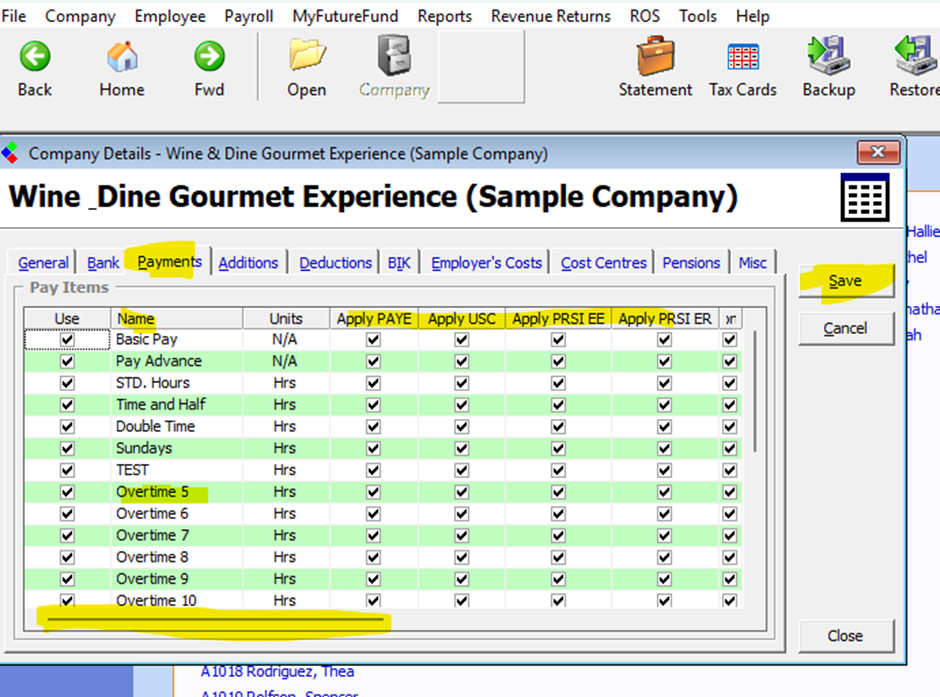
Open the company details screen, Browse to Company and Edit or click the Company Icon on the picture menu.
Select Payments.
You can rename any payment name (below the standard hours) by typing in a new heading. (This new heading will appear on the payslip.
Payment is tax allowable (no tax applies) – You should clear the boxes under the headings ‘Apply PAYE, Apply PRSI (Employee & Employer) and Apply USC’.
Payment is taxable (tax applies) – You should check (tick) the boxes under the headings ‘Apply PAYE, Apply PRSI (Employee & Employer) and Apply USC’.
Use the scroll bar at the bottom of the screen to view all column headings.
| Files | ||
|---|---|---|
| DataImage14.png | ||
| DataImage49.png | ||
 Get help for this page
